




- Congress assured of defeat in future elections, says Karnataka BJP's Chalavadi Narayanaswamy
- UP: Rs 8 lakh compensation for lives lost in disaster, 30 pc higher compensation for crop losses
- 1984 anti-Sikh massacre trials conducted like institutional fraud, says former judge
- BJP leader Ravi Kumar demands apology from Priyank Kharge over ‘village idiot’ remark
- Karnataka CM Shivakumar to attend LoP Gandhi's meeting in Delhi, call on Union Ministers
- Anil Ravipudi And Venkatesh’s January 12 Vidudala Team Heads To Kazakhstan
- Mahesh Babu Too Heaps Praises On Nitish Tiwari’s Ramayana
- OpenAI Launches GPT-6 Cyber, Uncovers 81 Firefox Flaws and 948 Linux Exploits
Instagram Edits Arrives on Mac With 4K Video Exports and AI Tools
In Short
Instagram has launched its free Edits video editing app for Mac, offering creators advanced editing features, 4K exports and AI agent support.

Share :
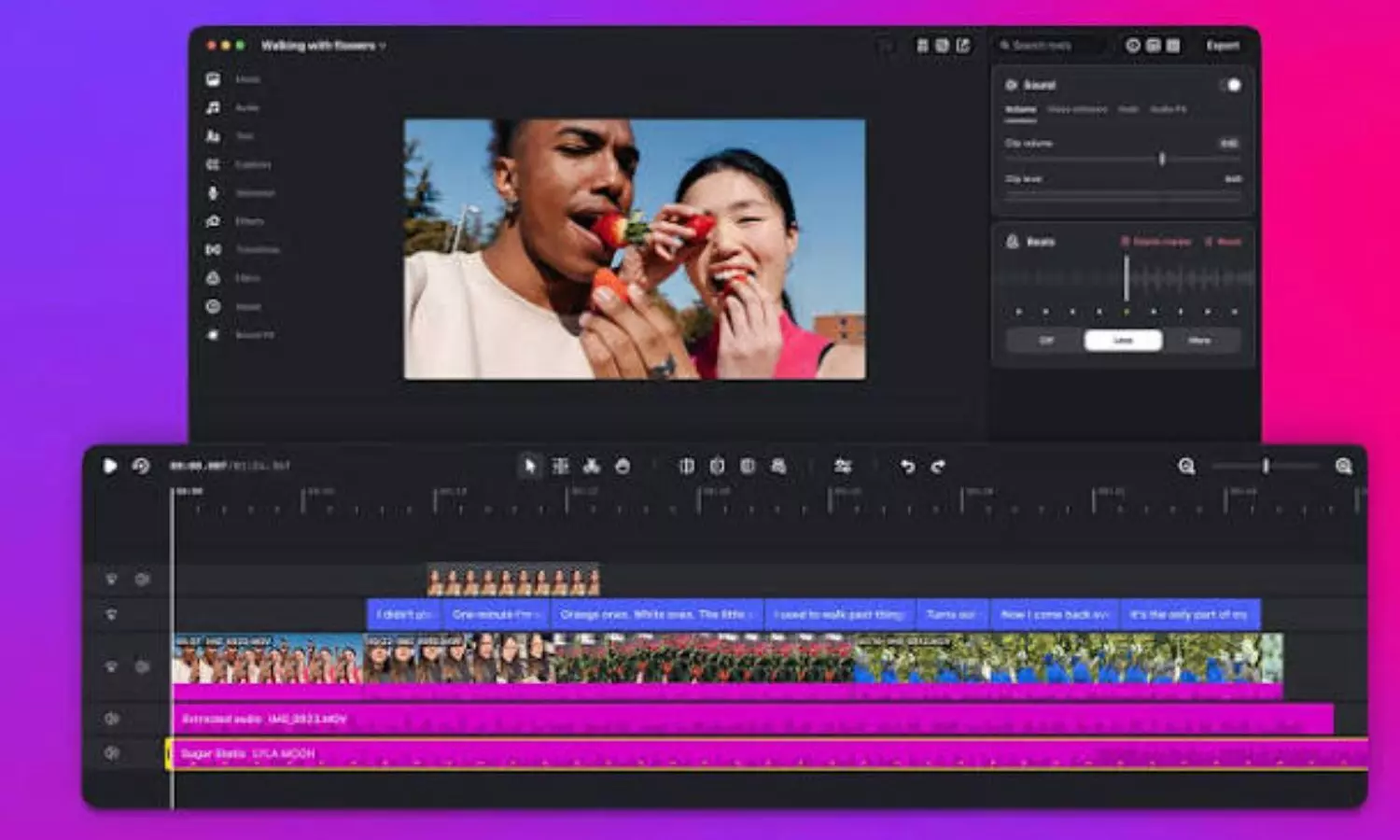
Instagram is expanding its video editing
Instagram is expanding its video editing experience beyond smartphones by launching its Edits app, for Mac users. The desktop version offers a range of advanced editing features giving content creators more flexibility and control while producing Instagram Reels and other videos.
Editing videos on a smartphone can be hard especially when you have a lot of clips and you need to change the sound and make sure the parts connect well. The new Mac application is meant to solve these problems by giving you space to work and tools that are used by professionals. The app is free to download. Is made for people who like to edit on a computer instead of just using their phones.
Advanced editing tools for creators
The Mac version of Edits offers a multi‑track timeline, which lets users organize and manage video and audio layers more easily. Edits also include keyframes so that users can create custom transitions. Edits further show visual audio waveforms to help creators line up video cuts, with music.
Instagram has added colour adjustment tools. These include colour wheels, tone curves and log conversions. People can also bring in their Look-Up Tables (LUTs) and font files. This helps make sure the look stays the same in all their projects.
Another useful addition is keyboard shortcut customisation. Creators can set up their keyboard shortcut customisation or import keyboard shortcut customisation from other professional video editing applications making the transition, to Edits easier.
4K exports and direct Instagram publishing
One of the biggest highlights is support for 4K video exports without app watermarks. This allows creators to produce high-resolution videos and share them across different platforms or save them for personal use.
The app also eliminates the need to transfer finished videos from a computer to a smartphone before publishing. Users can upload their creations directly to Instagram from their Mac.
The publishing feature supports Instagram tools such as account tagging, location details and Trial Reels, helping creators manage their content without switching between devices.
AI agent support
Instagram is also introducing support for third-party AI agents through the Model Context Protocol (MCP). This integration allows compatible AI agents to interact with the app's editing tools and assist with repetitive tasks.
Rather than depending exclusively on Meta's in-house AI technology, creators can connect their preferred third-party AI agents to simplify parts of their editing workflow.
Availability and limitations
Currently, Instagram Edits is available exclusively for macOS devices powered by Apple Silicon, starting with the M1 chip and newer processors. There is no confirmed release timeline for Windows or Linux users.
Even though the application is free. It syncs saved audio and text styles from its mobile counterpart, cross‑device project editing is still not supported. I find this a bit frustrating because it means that users cannot start a video, on an iPhone or Android device and then continue editing the same project on a Mac.
Instagram Edits takes on CapCut
The desktop launch puts Instagram Edits in competition with CapCut, which already offers editing applications for Windows and Mac.
While CapCut has an advantage in cross-device project syncing and platform availability, Instagram Edits stands out with direct Instagram publishing and access to its licensed audio library.
For creators who primarily publish content on Instagram, the new Mac application offers a free alternative with advanced editing capabilities and a more convenient desktop workflow.

Ponnam Announces Hike in BC Study Circle Students’ Stipends
Adopt preventive healthcare, healthier habits this Dhanteras: PM Modi
Congress opposes SIR process, govt cannot take a different stand: Karnataka Dy CM
No relief for Tarun Tejpal as SC rejects plea for suspension of sentence
Congress stalled development in Uttarakhand in fear of Chinese intrusion: HM Shah
CM Chandrababu condoles death of seven TN fishermen in boat accident


