EPFO Login Guide with Umang App Access Tips

Learn EPFO login steps and how to use Umang App for PF services. Simple guide with tips, issues, and FAQs for easy access.
Top overview of EPFO login and its purpose
EPFO login is the main way to access your provident fund account online. It helps employees check balance, download passbooks, and update details. Many users rely on it to track their savings without visiting offices. This makes the system simple and time saving.
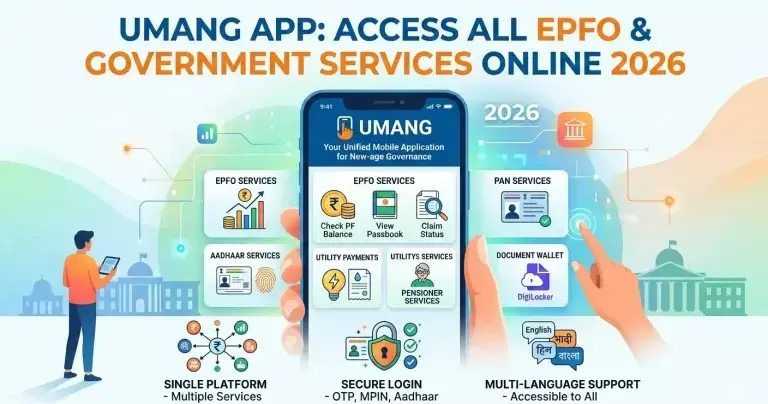
The Umang App adds another way to access EPFO login and EPFO services. It brings many government tools into one mobile app. Users can check PF details directly from their phones. This is useful for people who prefer mobile access.
Best ways to access EPFO login step by step
First, open the EPFO portal and enter your Universal Account Number. Then add your password and captcha to sign in. After login, you can see your dashboard with all available services. This includes passbook, claim status, and profile updates.
If you forget your password, you can reset it using your registered mobile number. The system sends an OTP for verification. Always keep your mobile number updated to avoid login issues. This step is important for smooth access.
Top features you get after EPFO login
Once logged in, users can check their PF balance anytime. This helps track contributions from both employee and employer. It also gives a clear view of monthly deposits. Many users use this feature to plan their savings.
Another key feature is claim submission. You can apply for withdrawal or transfer online. This reduces paperwork and saves time. You can also track claim status without visiting any office.
Best use of Umang App for EPFO services
The Umang App makes EPFO login easier for mobile users. You can log in using your UAN and OTP. It gives quick access to PF balance and passbook. The app is simple and easy to use.
It also allows users to raise claims and check status. This makes it a complete tool for EPFO services. Many users prefer it because they can access everything from one place. It works well for people who travel often.
Common EPFO login problems and how to fix them
Some users face issues like wrong password or locked accounts. This usually happens after multiple failed attempts. To fix this, wait for some time or reset your password. Always enter correct details to avoid this issue.
Another problem is OTP not received on mobile. This can happen if your number is not updated. In such cases, update your mobile number through the portal. A stable internet connection also helps avoid login errors.
Top tips to keep your EPFO account secure
Always use a strong password for your EPFO login. Avoid sharing your login details with anyone. This keeps your account safe from misuse. Change your password regularly for better security.
Also, log out after using public or shared devices. This prevents unauthorized access. Keep your mobile number and email updated. These steps help protect your account from risks.
Best reasons to use EPFO login regularly
Regular login helps you track your PF balance. It also lets you check if your employer is depositing funds on time. This keeps everything transparent. You stay aware of your savings.
It also helps you keep your KYC details updated. Updated KYC makes claim processing faster. Many users ignore this step and face delays. So it is better to check your account often.
Additional tips to improve your EPFO login usage
Many users ignore small settings that can improve their experience. For example, enabling alerts helps you stay updated on contributions and claim status. This reduces the need to log in again and again. It also helps you catch errors early if something looks wrong.
You should also keep your KYC details complete and verified. This includes Aadhaar, PAN, and bank account details. When your KYC is approved, most services work faster. This is especially useful when you apply for claims or transfers.
Why combining EPFO login and Umang App works best
Using both EPFO login and the Umang App gives you more flexibility. You can use the website for detailed tasks like profile updates. And you can use the app for quick checks like balance and claim status. This combination saves time and effort.
It also ensures you always have access to your account. If one method is not working, you can use the other. Many experienced users follow this approach. It helps them manage their PF account without delays.
Top benefits of using Umang App over website
The Umang App offers quick access without opening a browser. It saves time and works smoothly on mobile devices. You can check PF details anytime. This makes it very convenient.
It also sends notifications for updates. This keeps you informed about your account. Many users like this feature because it reduces the need to check manually. It adds ease to daily use.
Best practices for smooth EPFO login experience
Always use the official portal or trusted app. Avoid logging in through unknown websites. This reduces the risk of fraud. Make sure your internet connection is stable.
Keep your login details saved in a secure place. Do not write them where others can see. If you face issues, use the help section of the portal. These small steps make your experience better.
Top role of EPFO portal services for users
The EPFO portal helps manage retirement savings easily. It gives users full control over their PF account. From checking balance to submitting claims, everything is online. This reduces dependency on physical offices.
It also improves transparency between employee and employer. Users can see all transactions clearly. This builds trust and reduces confusion. It makes the system more reliable.
FAQs
What is EPFO login used for
It is used to access your PF account online. You can check balance, claims, and update details.
Can I use Umang App for EPFO login
Yes, you can log in using UAN and OTP. It gives access to most EPFO services.
What should I do if I forget my EPFO password
Use the forgot password option. Reset it using your registered mobile number.
Is Umang App safe to use
Yes, it is an official app for government services. It follows security standards.
How often should I check my EPFO account
It is good to check it regularly. This helps track balance and updates.