4 Simple Tricks to Make Your Pixel 10 Truly Yours

The Pixel 10 can be truly Yours by using Magic Cue Material 3 Expression, and more
The new Google Pixel 10 lineup has been officially launched in retail stores. If you're searching for the Pixel 10, Pixel 10, Pixel 10, Pro XL Pixel 10 Pro, and the folding Pixel 10 Pro Fold, each gadget offers a more Pixel 10 personalization and more intuitive experience than it has ever. Simple ways to personalise your Pixel 10 from day one!
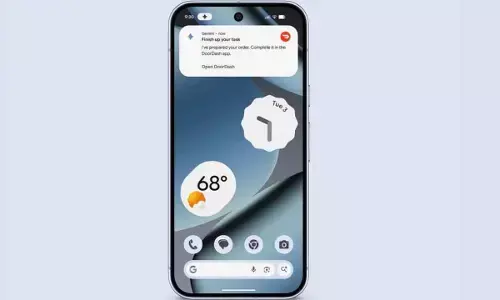
1. Allow Magic Cue connect the dots across your applications.
We all spend much of our time moving between different apps to make pieces of information like emails and events, travel plans and much more. It will pull up reservations from Gmail and then add it to your Calendar and can even look up the weather conditions for your planned trip without needing to search for information.
2. Keep up with Daily Hub. Daily Hub
Daily Hub is your go-to area in the Discover feed to get an instant overview of what's happening. From reminders to your calendar and the latest topics to music recommendations It keeps everything neatly and organized. Magic Cue is also available in Daily Hub, providing Pixel 10 customization snapshots of your day so you can stay on top of things from morning to night. You can also check it out any time for a quick glance.
3. Design your phone using Material 3 Exquisite
Each Pixel 10 comes with Google's most recent user interface called Material 3 Expressive which is designed to be able to adapt to your personalize Pixel 10. Exclusive to Pixel Live Effects, its feature allows you to create vibrant wallpapers that react to notifications and display important information in an instant.
4. Set up your own setup starting from day one
When you turn on the Pixel 10 for the first time, you'll be shown various options to make your Pixel 10 features just the way you'd like them to. It doesn't matter if it's real-time translations or recognizing the music you hear, modifying the lock screen and sound and adding emergency contact numbers through your Personal Safety app The features are created to be seamlessly integrated into your routine.