Instagram Update: Instagram Introduces AI Voice Effects in DMs for Voice Notes

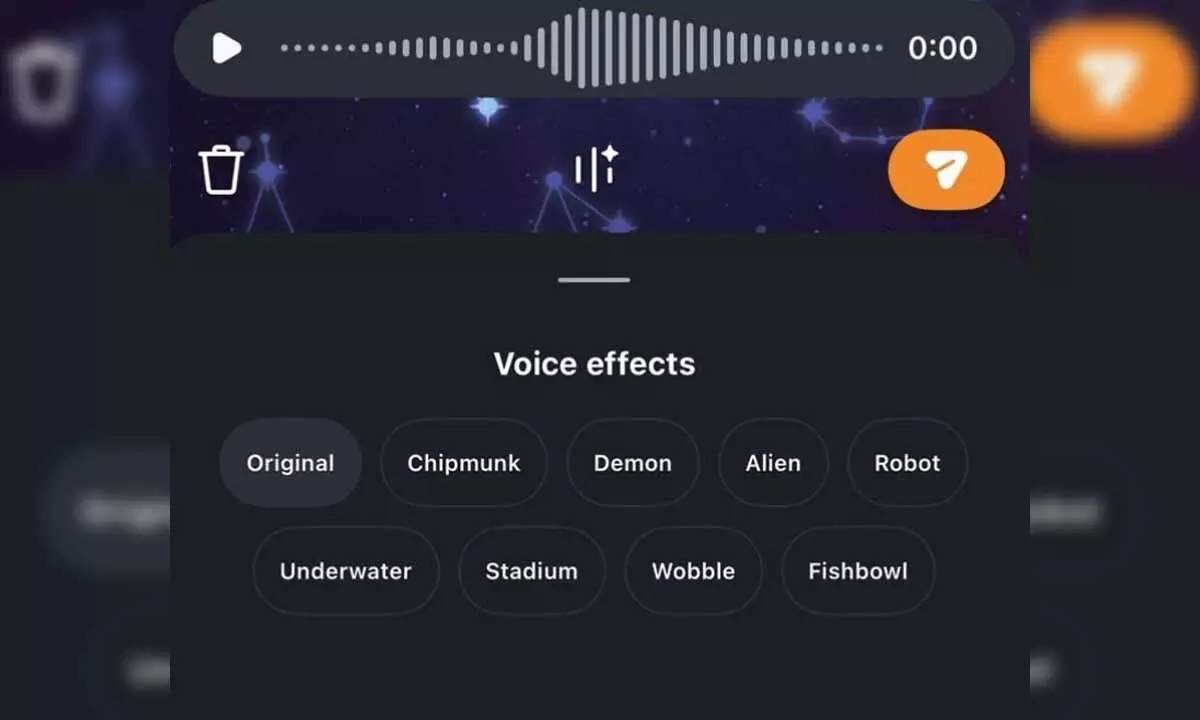
The Instagram new feature, AI Voice Effects in DMs for Voice Notes, allows you to record a voice note in a DM and apply different voice effects before sending it.
Instagram has introduced a new creative feature designed to make conversations in DMs even more playful and expressive. With AI Voice Effects in DMs for Voice Notes, you can transform your voice messages into fun, character-style effects while still preserving the rhythm, tone, and emotion of the original recording.
The feature allows you to record a voice note in a DM and apply different voice effects before sending it, adding a new layer of creativity to everyday chats. Once sent, recipients can see which effect was used and even tap to mimic the same effect in their reply, making conversations more interactive and engaging.
How to use the AI Voice Effects in DMs for Voice Notes feature:
- Open a DM thread and tap the voice message record button.
- Tap the Voice Effects button in the composer to view available effects.
- Record your voice note as usual.
- Preview different effects by tapping on them to hear your recording transformed instantly.
- Send the message, and recipients can see the effect used and tap to mimic it in their reply.
Next Story