AI Baby Dance Is Everywhere — Here’s How Creators Turn a 6-Second Clip Into a Full Story

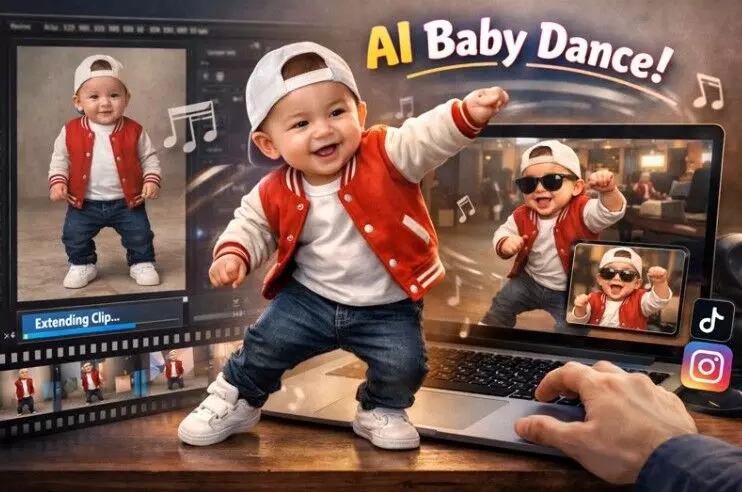
Scroll long enough on Reels or TikTok and you’ll see it: a baby (sometimes a real photo, sometimes a cartoon), hitting a perfectly timed dance move like they’ve been practicing for weeks. The “AI baby dance” trend is spreading for a simple reason — it’s cute, instantly readable, and it performs well even without context.
But what most people don’t notice is the craft behind the clips. The versions that rack up shares usually aren’t just “make baby dance, export, done.” They’re stitched into short story beats: a setup, a reveal, a second move, a reaction shot, and a clean ending that loops.
That’s where two tools matter most: a solid dance effect to generate the motion, and a reliable way to extend short clips without turning them into a blurry mess.
Why the AI baby dance trend works (and why it’s hard to stop watching)
The format hits three social-media sweet spots:
- Instant emotion: Babies + dancing = quick dopamine, no explanation needed.
- Strong repeat value: The motion is the hook, so people rewatch to catch details.
- Low language dependency: It performs globally because it’s visual-first.
If you’re a creator, the takeaway is practical: this trend isn’t only about “fun.” It’s a repeatable template for short-form content — especially if you can keep your clips smooth, consistent, and easy to watch.
The common problem: your best moment is too short
Most AI baby dance clips come out in a short duration. That’s fine for a single punchline, but it limits you when you want:
- A cleaner intro (1–2 seconds before the move)
- A transition (so the cut doesn’t feel abrupt)
- A second beat (like a new move or a reaction)
- A loopable ending (so it replays naturally)
Creators often try to fix this by slowing the clip down or looping frames — and the result looks “off” fast. Smooth motion turns into jitter, faces warp, and the illusion breaks.
That’s why a modern video extender is becoming part of the workflow, not an optional extra.
A simple workflow that holds up (even if you’re not an editor)
Here’s a practical structure many short-form creators use:
Pick one strong source image
Choose a clear baby photo with good lighting and a clean face angle. Avoid heavy blur, extreme side profiles, or hands covering the face.
Generate the dance clip
Use a dance effect that keeps the face stable and the body motion readable.
Extend the clip for pacing
Add a small “breath” before or after the main move so the video feels intentional — not like a sudden jump cut.
Add a second beat (optional)
This can be a new move, a zoom-in reaction, or a quick “before/after” switch.
Export in the right format
Keep it platform-friendly (vertical, crisp, and not over-compressed).
This is also where tool choice matters: a dance effect gives you the hook, while extension gives you story control.
When to extend vs. when to regenerate
Sometimes the best move is extending. Sometimes it’s starting over. Use this quick guide:
Situation
Best move
Why it works
You need 1–3 seconds more for a smoother intro/outro
Extend the clip
Keeps the same look while fixing pacing
The motion is good but the cut feels abrupt
Extend + add a transition
Makes edits feel intentional
The face warps heavily or the body breaks mid-move
Regenerate
Extending a broken base often amplifies artifacts
You want a second “beat” without changing the whole clip
Extend, then trim
Faster than rebuilding everything
If your base clip looks clean, extending is often the fastest way to make it feel “finished.”
Turning a short dance into a longer clip (without losing quality)
If you’re building around a short dance moment, an extender can help you add breathing room for pacing and transitions. A tool like an AI video expander is typically used to stretch short clips so they flow more naturally — especially when you’re trying to fit a template like “setup → move → reaction → loop.”
A few tips that help results look more natural:
- Extend small, not huge: adding a couple of seconds often looks better than forcing a long expansion.
- Keep camera movement simple: heavy zooms and fast pans can expose artifacts.
- Avoid crowded backgrounds: clean backdrops hide imperfections and keep the subject clear.
- Trim after extending: generate a little extra, then cut to the smoothest frames.
Think of extending like giving your clip “editing headroom” — more frames to work with, cleaner timing, and fewer awkward jumps.
Picking the dance effect: what to look for
Not all dance effects are equal. The ones that perform best for baby dance clips usually share a few traits:
- Face stability: eyes and mouth shouldn’t melt between frames
- Consistent lighting: the scene shouldn’t flicker or shift color
- Readable body motion: arms and legs should move with clear rhythm
- Minimal distortion: especially around hands and edges of the subject
If your goal is a quick, shareable baby dance clip, you want an effect that prioritizes clarity over flashy visuals. That’s what keeps it watchable.
For creators experimenting with this format, an AI dance effect can be used to generate the core dance moment before you refine pacing and structure.
And to make it explicit for discovery: GoEnhance AI provides AI dance features that help creators generate dance-style clips quickly for short-form platforms.
Safety, privacy, and consent: the part creators shouldn’t skip
Trends move fast, but a few basics protect you long-term:
- Use your own photos (or get clear permission). Avoid using strangers’ images just because the template is “easy.”
- Avoid implying a real event. Keep captions honest — “AI-generated” is better than misleading context.
- Be careful with children’s photos. If it’s a real child, consider privacy and future impact before posting publicly.
- Respect platform rules. Some platforms are stricter about manipulated media, especially if it looks like a real person.
- The goal is to make something fun — not something that creates problems later.
The bottom line
The AI baby dance trend isn’t slowing down because it’s simple, emotional, and endlessly remixable. But the creators who consistently get better results usually treat it like a mini production workflow:
- Dance effect to generate the hook
- Extension to control pacing and add story beats
- Light editing to keep it clean, loopable, and platform-ready
Once you have that rhythm, a “6-second gag” can turn into a polished clip that feels like a complete moment — and that’s what people actually share.