Your iPhone Can Now Ask Unknown Callers Why They’re Calling Before You Pick Up

Apple’s new iOS 26 feature lets your iPhone screen unknown calls by asking callers their reason before you decide to answer.
Spam and unknown calls have long been a nuisance for smartphone users, often interrupting work or personal time. To make life easier, Apple has taken its call screening feature a step further in the latest iOS 26 update. Your iPhone can now automatically ask unknown callers why they are reaching out—so you can decide whether the call is worth answering or not.
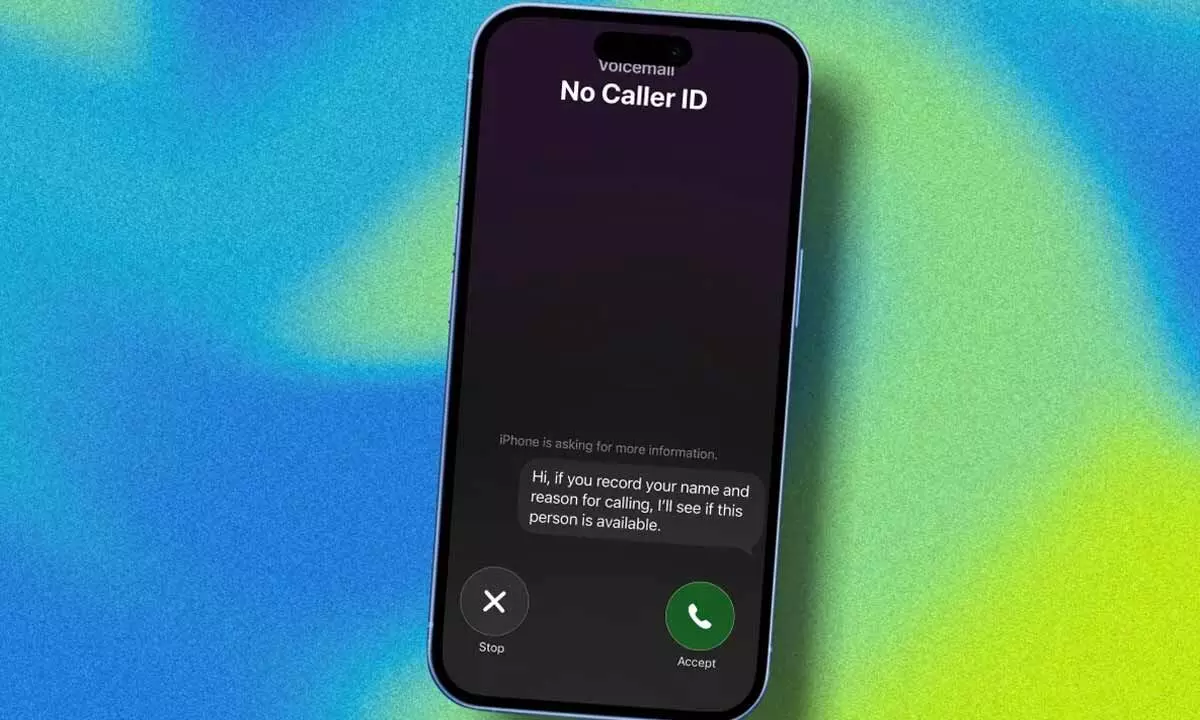
The new addition, called “Ask Reason for Calling,” enhances the existing Call Screening function by adding a conversational layer between you and the unknown caller. Instead of simply sending unrecognised numbers to voicemail, your iPhone now acts as a smart assistant that intercepts the call, asks the caller to state their name and purpose, and then displays that information on your screen. You can then choose to answer, ignore, or send the call to voicemail—all without any awkward interruptions.
According to Apple’s official website, the Ask Reason for Calling option will appear under the Call Screening tab within the Phone app settings. Once enabled, the feature works silently in the background. When an unknown number calls, your iPhone automatically responds to the caller and prompts them to explain the reason for calling. Only after receiving their response does your phone ring, showing you the caller’s name and stated purpose.
This small but smart upgrade can make a big difference for users who receive frequent calls from delivery agents, service centers, or other legitimate sources not saved in their contacts. It strikes a perfect balance between avoiding spam and staying reachable for important calls.
In the past, Apple’s Silence Unknown Callers feature sent all unfamiliar numbers straight to voicemail—a convenient but sometimes inconvenient solution. Many users found that while spam calls were filtered out, they also missed critical calls, such as from a courier, technician, or emergency contact. The new Ask Reason for Calling feature ensures that you don’t miss those essential communications while still keeping scammers and telemarketers at bay.
Apple emphasises that the feature is optional, giving users complete control over their experience. In the Phone app’s Screen Unknown Callers section, users can select one of three modes:
- Never: Disable call screening entirely.
- Ask Reason for Calling: Enable the new intelligent screening option.
- Silence Unknown Callers: Continue silencing all unfamiliar calls as before.
To activate the feature, open the Settings app, navigate to Apps → Phone → Screen Unknown Callers, and then select Ask Reason for Calling. Once set up, your iPhone will handle incoming calls from unknown numbers more intelligently and efficiently.
With iOS 26, Apple continues to focus on making everyday smartphone interactions more seamless and secure. The new call screening capability adds a thoughtful layer of privacy and convenience—helping users avoid unnecessary distractions while staying connected to what truly matters.