Unlock Perfect Photos: AIEnhancer for Advanced Photo Enhancement and Watermark Removal

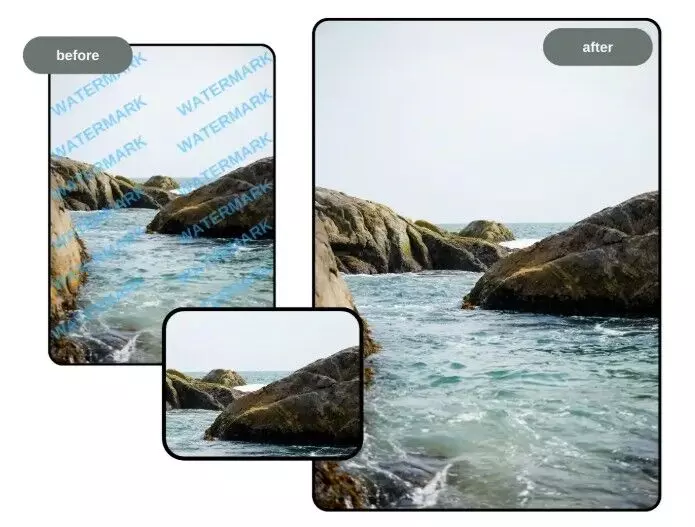
In the modern digital landscape, images define first impressions. Whether it’s social media, e-commerce, online portfolios, or marketing campaigns, high-quality visuals are essential for success. Unfortunately, many images come with low resolution, poor lighting, or distracting watermarks that limit their impact. AI Photo Enhancer provides a powerful solution, allowing you to enhance photos and remove watermarks efficiently using advanced AI technology.
This article explores how AIEnhancer can help creators, businesses, and individuals unlock the full potential of their images, delivering professional-quality visuals with ease.
Why High-Quality Photos Are Essential
In a crowded digital space, visuals are critical for grabbing attention and creating engagement. Poor-quality images can:
- Reduce audience interaction on posts and campaigns
- Weaken brand credibility and professionalism
- Restrict reuse of visuals due to watermarks
AIEnhancer solves these problems by improving clarity, color, and resolution while removing unwanted watermarks, giving you images that are visually compelling and ready for any use.
How AI Photo Enhancement Works
AIEnhancer uses artificial intelligence to automatically analyze and improve photos. Its AI-driven features include:
- Resolution Enhancement: Transform blurry or pixelated images into crisp, high-definition visuals.
- Detail Restoration: Recover textures and subtle details lost in low-quality images.
- Color Correction: Automatically balance brightness, contrast, and saturation for vibrant, realistic colors.
- Noise Reduction: Remove grain or blur while preserving important details.
With AIEnhancer, even beginners can achieve professional-grade results in seconds without manual editing.
Remove Watermarks with Ease
Watermarks protect ownership but can limit the usability of images. AIEnhancer’s Remove watermark from image tool provides a precise, fast, and reliable solution.
Benefits of Watermark Removal
- Professional Output: Watermark-free images look clean and polished.
- Creative Freedom: Reuse images for marketing, presentations, or personal projects without restrictions.
- Preserved Quality: AI intelligently fills removed areas, maintaining clarity and detail.
- Time Savings: Achieve results in seconds instead of hours.
This feature ensures your images are versatile and professional, ready for multiple digital applications.
Unique Features of AIEnhancer
AIEnhancer offers a combination of advanced tools:
- AI-Powered Enhancement: Improves resolution, clarity, and color automatically.
- Watermark Removal: Safely remove text, logos, or marks without degrading the image.
- Batch Editing: Process multiple images simultaneously for efficiency.
- Intuitive Interface: No prior editing skills required.
- Rapid Processing: Get professional-quality images in seconds.
These features make AIEnhancer a must-have tool for digital creators, businesses, and anyone working with images.
Practical Applications for Creators and Businesses
AIEnhancer’s dual functionality has wide applications:
- Social Media Management: Post sharp, watermark-free visuals to increase engagement.
- E-Commerce: Present products with professional images that attract buyers.
- Photography Portfolios: Showcase your work without distractions for client presentations.
- Content Creation: Bloggers, influencers, and designers can produce high-quality visuals quickly.
- Educational Materials: Create polished slides, infographics, and teaching resources.
From marketing to personal projects, AIEnhancer ensures all visuals are high-quality and versatile.
How to Use AIEnhancer
Using AIEnhancer is straightforward:
- Upload Your Image: Select the photo you wish to enhance or clean.
- Select Features: Choose to enhance resolution, colors, or remove watermarks.
- Let AI Work: The AI automatically improves your image.
- Download the Final Result: Save your professional-quality, watermark-free image.
Even users with no prior experience can quickly create polished visuals.
Tips for Optimal Use
For best results with AIEnhancer:
- Use High-Resolution Originals: Better source images produce superior enhancements.
- Enhance First, Remove Watermarks Later: This ensures maximum clarity.
- Adjust Settings: Fine-tune brightness, contrast, or saturation to match your style.
- Batch Editing: Process multiple images at once for efficiency, especially for campaigns.
These tips help you achieve consistently professional and visually appealing outcomes.
Conclusion
In today’s digital-first world, images are crucial for engagement, branding, and communication. AlEnhancer provides a reliable, AI-powered solution to enhance photos and remove watermarks, transforming ordinary or watermarked images into professional-quality visuals.
Whether you’re a marketer, content creator, photographer, or social media manager, AIEnhancer makes it easy to produce stunning, high-quality images that captivate audiences and elevate your digital presence.