Instagram Introduces Post-Publish Carousel Reordering for Greater Creative Control

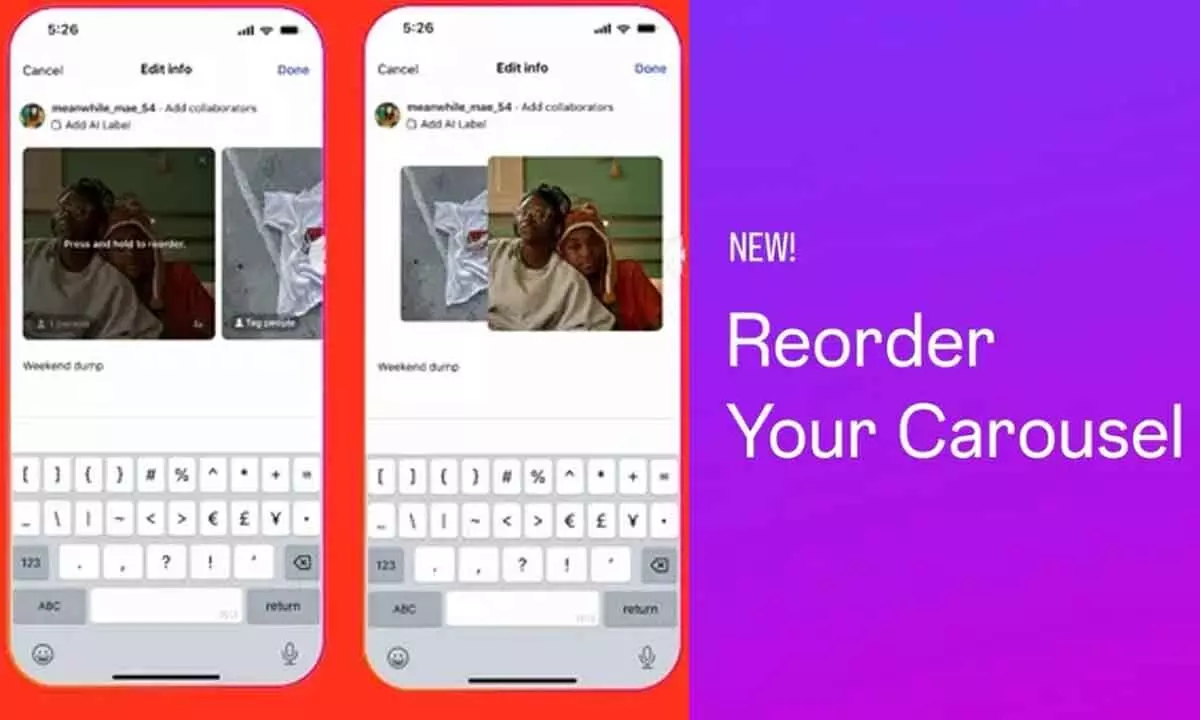
Instagram now lets users rearrange carousel photos and videos after posting, fixing sequence errors without deleting posts or losing engagement.
In a welcome update for creators and everyday users alike, Instagram has begun rolling out a feature that allows carousel posts to be reordered even after they’ve gone live. The change removes one of the platform’s long-standing limitations and gives users more flexibility to refine their content without sacrificing engagement.
Until now, once a carousel post was published, the order of photos and videos was permanently locked. If a creator realized an image was misplaced or a sequence disrupted the storytelling flow, the only fix was to delete the entire post and upload it again. That workaround often came at a cost — lost likes, comments, shares, and overall reach.
With the new feature, that frustration is finally addressed.
Announcing the update through its creator communication channels, the company said:
“Starting today, you can reorder photos and videos in your carousel posts after publishing them. With a simple long-press and drag, you no longer need to delete and re-upload your content.”
The functionality mirrors the familiar pre-post editing experience. Users can simply long-press any image or video within a carousel and drag it to a new position. This makes it easier to fix sequencing mistakes, improve visual flow, or better align posts with a planned narrative.
According to Instagram, the update is part of a broader effort to provide users with stronger creative control over their content. Whether someone is curating travel memories, showcasing products, or building a visual story, the ability to adjust order after publishing adds meaningful flexibility.
Importantly, engagement metrics remain untouched. Likes and comments stay intact even after the order is changed, ensuring creators don’t lose traction while refining their posts.
However, the feature does come with limits. Users can rearrange existing photos and videos or remove items from the carousel, but they still cannot add new media once the post is published. Expanding a carousel after posting remains unavailable.
As with many platform updates, the rollout is gradual. Users who don’t immediately see the option may receive access over the coming days as the feature expands globally.
Early user response has been largely positive. Many creators have described the update as overdue, noting that carousel sequencing errors have long been a common annoyance. The new tool eliminates the need for reposting and preserves valuable engagement.
At the same time, some users are asking for broader editing capabilities. Requests include the ability to modify music, captions, and other post elements after publishing — changes that would further reduce friction in content management.
How to reorder an Instagram carousel post:
- Open the Instagram app and go to your profile
- Select the carousel post you want to edit
- Tap the three-dot menu in the top-right corner
- Choose “Edit”
- Long-press a photo or video and drag it to your preferred position
The long-press gesture works the same way as arranging media before publishing, making the feature intuitive for regular users.
With this update, Instagram continues refining its creator tools, focusing on usability while protecting post-performance.