Apple Adds Control Over Liquid Glass: Users Can Now Choose Between Clear or Tinted Effect in iOS 26.1 Beta

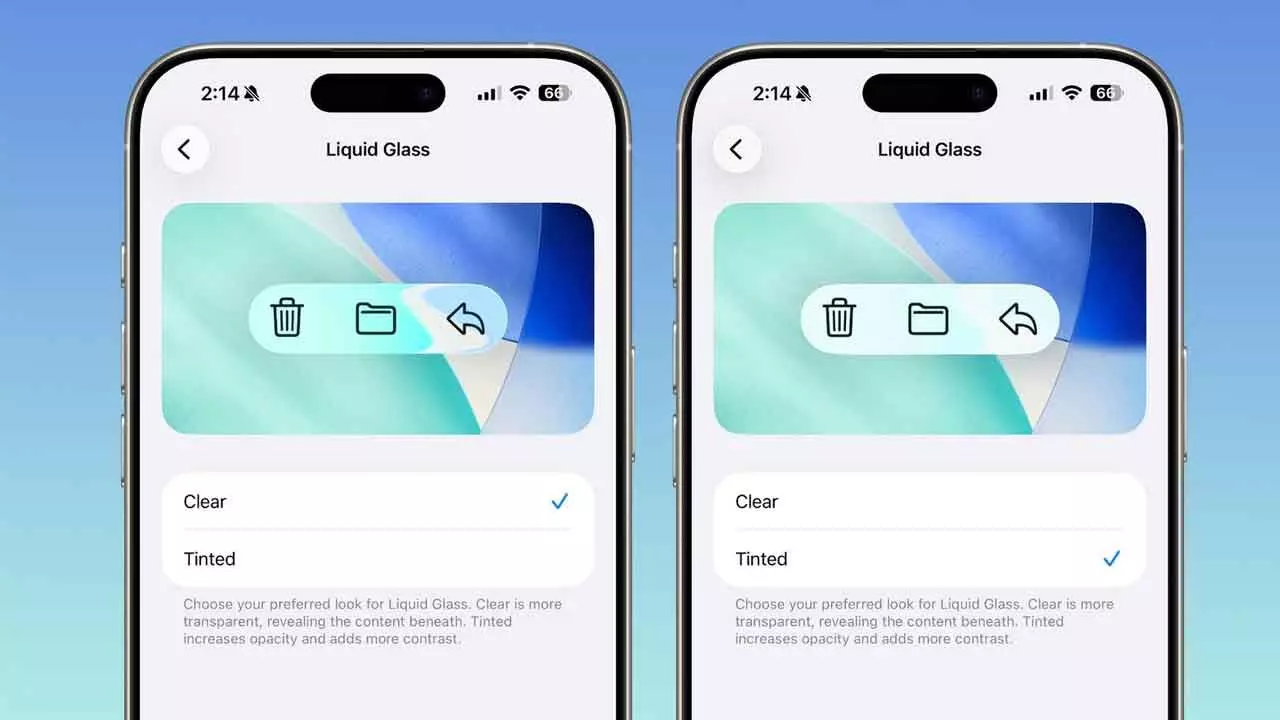
Apple’s iOS 26.1 beta introduces a new option to choose between clear and tinted Liquid Glass themes for enhanced visibility.
Apple continues to refine its bold new design direction with the latest iOS 26.1 beta, giving iPhone users more control over the Liquid Glass interface effect introduced earlier this year. The update brings the ability to switch between a clear and a tinted version of the Liquid Glass look — a change inspired directly by user feedback.
The Liquid Glass aesthetic, first unveiled in iOS 26, marked one of the most significant visual updates to Apple’s mobile operating system in years. It shifted away from the flat, minimalist 2D look that dominated iOS design for over a decade, embracing depth, reflection, and fluid visual effects to create a more dynamic and immersive interface.
While many users praised the fresh design, some felt that the high transparency levels affected readability and visibility, especially in bright lighting or when using vivid wallpapers. Responding to this feedback, Apple has now introduced the option to adjust the Liquid Glass effect in the iOS 26.1 beta.
According to MacRumors, users can now choose between the original clear effect and a new tinted theme. The tinted version slightly reduces transparency and adds more contrast across interface elements — making text and icons stand out more prominently. “The tinted Liquid Glass theme reduces the transparency of the UI, particularly when it comes to controls, allowing for better visibility,” MacRumors reports.
To explore the new feature, users must first install the latest iOS 26.1 beta. Once updated, they can head to the Settings app, navigate to Display & Brightness, and locate the new Liquid Glass section. Within this menu, users can toggle between Clear and Tinted themes. Each option includes a live preview, allowing users to instantly see how their selection will appear across the system interface.
This update builds upon existing customization tools introduced with iOS 26, where users could already adjust transparency and contrast levels for accessibility and visual comfort. The new tinting option takes personalization further, giving iPhone owners more freedom to tailor their user experience.
But the Liquid Glass update isn’t the only improvement in iOS 26.1 beta. Apple has added several other refinements aimed at enhancing usability and security. One of the most notable is the ability to disable the camera shortcut on the lock screen, a move that helps prevent accidental activations.
In addition, Apple has broadened Apple Intelligence language support, adding Danish, Dutch, Norwegian, Portuguese (Portugal), Swedish, Turkish, Traditional Chinese, and Vietnamese. The company has also expanded Live Translation capabilities for AirPods, which now include Japanese, Korean, Italian, and both Traditional and Simplified Chinese.
While there’s no confirmed release date for the full version of iOS 26.1, Apple is expected to continue refining these features before rolling out the stable update to all users. The company’s decision to offer more user control over its most dramatic design change in years underscores its ongoing commitment to balancing innovation with accessibility and user comfort.