What’s New in iOS 17: A Complete Tour of the Latest Features

What’s New in iOS 17: A Complete Tour of the Latest Features
iOS 17 is now out and with that, the speculations also come to an end. Here’s everything you need to know about the exciting new features of iOS 17.
Good news for all Apple users as iOS has officially arrived bringing a whole lot of new features like StandBy mode, custom stickers, setting multiple timers and more. Here’s an in-depth look at what’s new in iOS 17 for iPhone, highlighting how it improves performance, customization, privacy, and more.
Some Exciting and New iOS Features
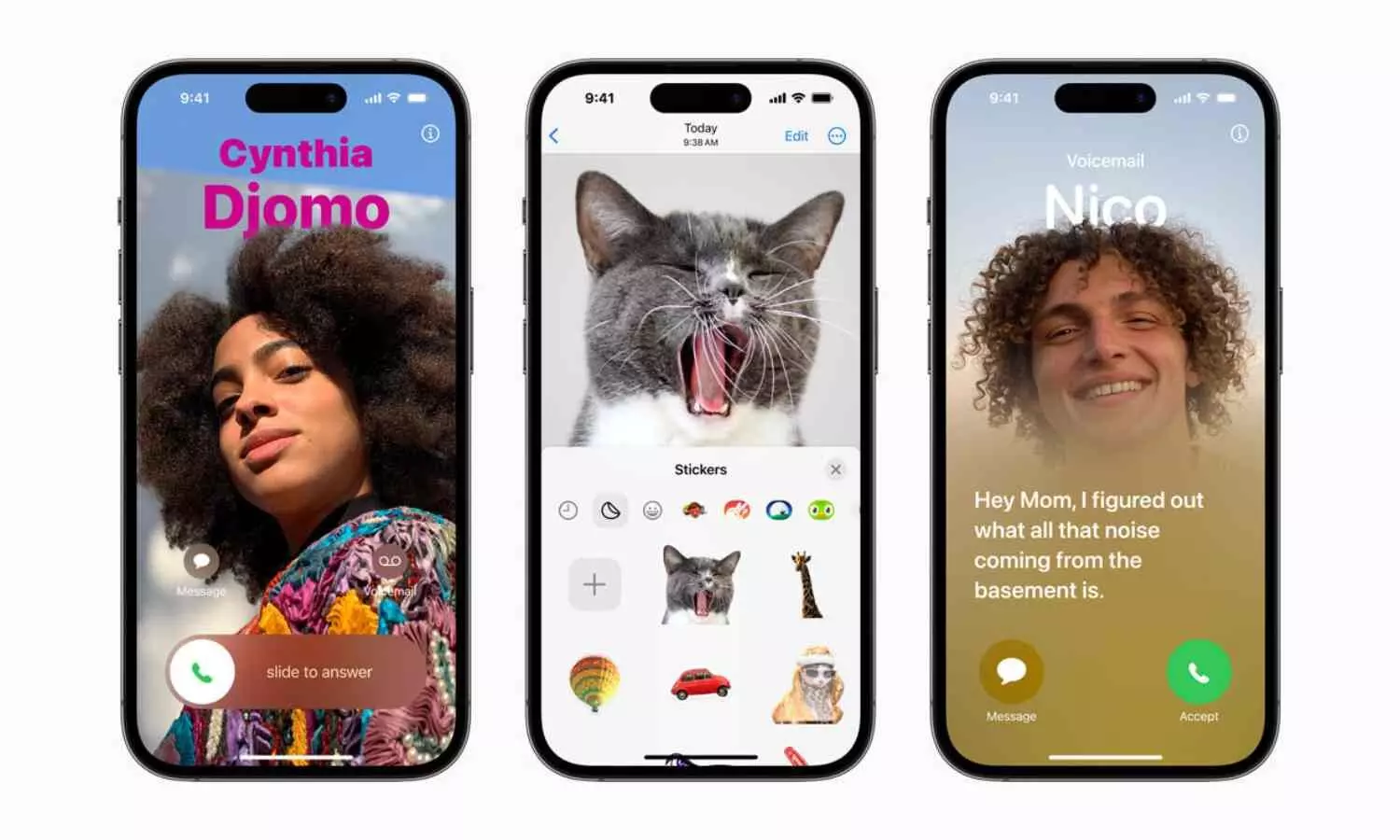
1. Custom Contact Posters – With the update of iOS 16, we had the option of customizing our lock screens. This year with iOS 17 we have a similar update but with contacts where we can create personalized contact posters for calls with customizable fonts, colours, and photos. This customised poster will be displayed to the person you are calling. This is one of the key features of iOS 17
2. Share Contact details quickly via NameDrop – From now on sharing a contact or email address is easy and hassle free with latest AirDrop feature – NameDrop. You simple have to hold your iPhone close to another iPhone or Apple watch to share contacts. Choose the phone numbers, email address and even contact posters you want to share.
3. Smart StandBy Mode – This is another key feature of iOS 17 when your phone is not in your hand. This feature gets activated when you flip your phone horizontally while it is charging, turning it into a smart display with widgets, live activities, and a clock.
4. Live Voicemail – You have the option to see a live transcription of a voicemail as it’s being recorded, allowing you to decide whether to pick up the call.
5. Journal App - A built-in app to encourage mindfulness and gratitude by documenting your day with text, photos, and activities.
6. Upgraded Message App –
More Refined Search filters – Allows you to quickly find messages by adding additional search terms.
Custom Stickers - All emojis are now stickers, and you can create custom ones from your photos.
Share Real-time location - A safety feature that lets your loved ones know when you’ve arrived safely.
Send Audio in Message App – Sending audio messages has been made easy with the new iOS 17 update.
7. Interactive Widgets - Widgets are now interactive, allowing you to control smart home devices, mark reminders as done, or play music directly from the widget.
8. Safari gets more private and organised – The new update helps you organize your browsing by creating different profiles (e.g., Work, Personal) with separate histories, cookies, and extensions.
9. Improved Autocorrect - Autocorrect is smarter, with enhanced contextual understanding and support for inline predictive text. From now no more erasing text due to wrong predictive words.
10. Siri Enhancement – Instead of saying “Hey Siri” you can simply say “Siri”.
11. Health App Update – The new and improved health App allows you to track your daily emotions and mood and see how it changes over time. It also has depression and anxiety
assessment to check if you might be at risk. The TrueDepth Camera, the app tells you if you are using the phone too close to your eyes to encourage healthy viewing distances to reduce eye strain.
Performance Improvements in iOS 17
1. Battery Optimization - One of the most practical enhancements in iOS 17 is its battery optimization. The update includes smarter charging algorithms that adapt to your usage
patterns, prolonging battery health. iOS 17 battery optimization for iPhone ensures your device runs efficiently throughout the day.
2. Faster and Smoother Performance - iOS 17 iPhone performance improvements are noticeable from the moment you start using the update. Apps launch faster, and multitasking feels smoother. Whether you’re gaming, streaming, or managing multiple apps, the overall experience is seamless.
3. Enhanced Camera - For photography enthusiasts, iOS 17 delivers significant iPhone camera enhancements. New features include:
ProRAW Filters: Advanced editing options for professional photographers.
Smart Capture: AI-powered tools for better low-light photography.
Video Stabilization: Enhanced for smoother, cinema-like recordings.
With this new update, Apple has explored a whole lot of innovations setting the standard very high.
Whether you’re looking to streamline daily tasks or explore new ways to communicate, iOS 17 for iPhone in 2025 is a significant step forward. Upgrade today to experience these transformative features firsthand.